Luminar Neo: Redefining What Photo Editing Can Do
 By Jordan Midea
Are you ready to revolutionize your photo editing experience? Luminar Neo is here, challenging traditional editing methods with innovative features that promise to simplify your creative process. This cutting-edge tool streamlines workflows and effortlessly empowers photographers, content creators, and designers to achieve breathtaking results.
What sets Luminar Neo apart? Its intelligent AI tools, user-friendly interface, and flexible adjustments make it a game-changer for anyone looking to enhance their images. Prepare to discover how Luminar Neo transforms your editing tasks, enabling you to produce professional-quality photos quickly. Keep reading to learn how this powerful software can boost your creative journey!
Edit Like a Pro with Luminar Neo’s AI-Powered Magic
Best For Hassle-Free Editing
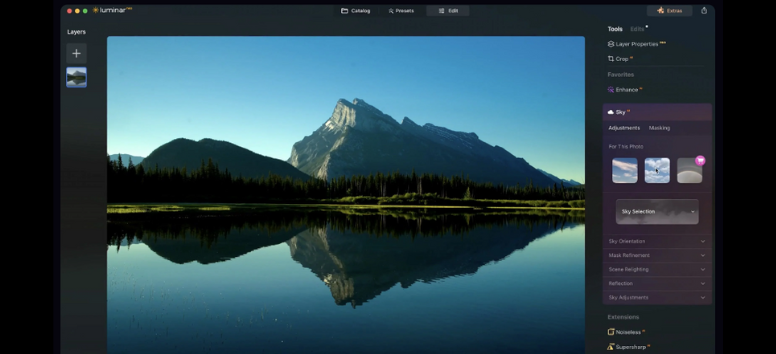
One of the main perks of Luminar Neo is how easy and friendly it is to use. Unlike older photo editing programs that throw countless choices at you and can be really tough to learn, Luminar Neo makes things simple. Its layout is clear, enabling users to move between tools and features smoothly without a hitch. Whether you’re a pro behind the camera or just dabbling on the side, you’ll pick it up quickly and be creating amazing photos in no time.
Another standout feature of Luminar Neo is how accessible it is. It’s crafted for a wide audience, no matter how tech-savvy you are. With AI-driven tools tackling challenging tasks like tweaking details, adjusting brightness, and eliminating distractions, even newbies can get striking, professional results. So jump in and have fun!
Experience Luminar Neo now and feel the magic of AI-powered photo editing. Its simple design and easy tools let you create amazing images quickly and effortlessly!
Best For Letting AI Do the Work
Luminar Neo makes photo editing a breeze, allowing you to unleash your creativity without getting bogged down by tedious tasks. Check out these standout AI features:
-
Accent AI: Adjust up to twelve controls with just one slider for naturally beautiful results. Say goodbye to complicated adjustments!
-
Relight AI: Fix underexposed photos effortlessly. Add realistic light and gain full control over exposure in your shots.
-
Sky AI: Replace the sky in one click! Choose from stunning skies and effortlessly enhance your image's atmosphere while preserving reflections.
-
Atmosphere AI: Add a unique mood with fog, mist, or haze. Achieve maximum realism using content-aware masking.
-
Structure AI: Enhance contrast and detail for captivating images by bringing out sharp details without compromising the look of human figures.
-
Supercontrast: Gain precise control over tonal contrast with six AI controls, perfect for making highlights, midtones, and shadows stand out.
-
Crop AI: Crop like a pro! Using insights from remarkable photographers, Crop AI helps you create impactful compositions.
Get Luminar Neo so you can focus on what truly matters—your creativity!
Best For Precision and Control
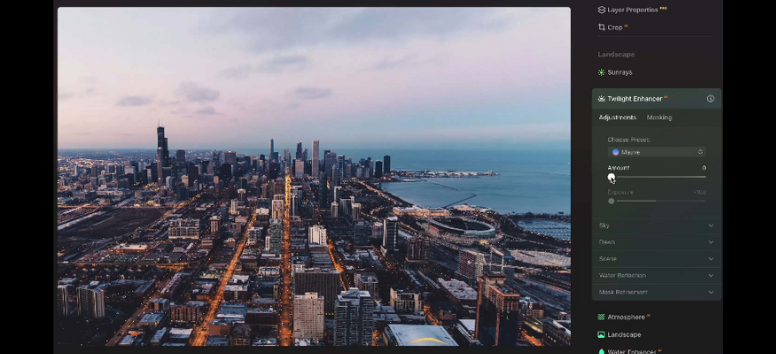
Unlock the potential of your images with Luminar Neo’s powerful editing tools! Here’s a breakdown of key features to enhance your photo editing skills:
-
Develop/Develop RAW Tool: This tool is essential for adjusting color and tone, ensuring a balanced and polished look for your images. It automatically activates for unedited RAW files, setting the foundation for further enhancements and edits.
-
Erase Tool: Easily removes unwanted objects with a click. Visual red overlay helps you see what you’re erasing.
-
Color Tool: Saturation controls the overall intensity of colors, while Vibrance enhances muted tones without altering vivid ones. With Hue/Saturation/Luminance and Hue Shift, you can fine-tune or dramatically modify colors to achieve precise, customized results.
-
Black & White Tool: Converts color images to stunning black and white. Adjusts brightness and saturation for each color channel.
-
Details Tool: Enhances sharpness and clarity without artifacts.
-
Denoise Tool: Reduces grain from high ISO settings or long exposures.
-
Vignette Tool: Darkens/lightens image edges to focus on the subject.
Explore editing with Luminar Neo and revamp your photos in just minutes! Get Luminar Neo now!
Best For Editing Anytime, Anywhere
Luminar Neo offers amazing flexibility! You can edit your pictures wherever you are, be it at home or on the move. It works wonderfully with both Windows and macOS. Plus, it can also function as a plug-in for Photoshop or Lightroom. This means you can easily fit Luminar Neo into your workflow, whether you’re in the studio or out and about.
Best For an Intuitive Experience
If you're looking for an award-winning interface that simplifies photo editing, Luminar is your go-to solution! This software is tailored for everyone—whether you're a beginner or a seasoned pro. With its intuitive AI-powered controls, Luminar automates complex tasks that usually take multiple steps, making it effortless to enhance your images. Boost creativity without getting bogged down by technicalities! Take the leap and get Luminar Neo today! Your stunning photos await!
Best for Stunning Landscape Edits
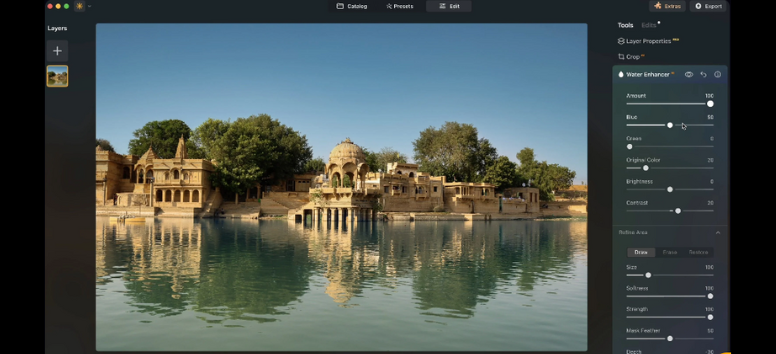
Transform your landscape photographs into breathtaking works of art with Luminar Neo’s AI-powered editing tools. Here’s how you can achieve results as epic as your imagination!
Perfect Light And Color With Enhanceai
-
Luminar Neo spots common capture issues instantly.
-
EnhanceAI creates a personalized brightness map, balancing light and color throughout the image, ensuring each photo radiates brilliance.
Command The Heavens With AI
-
Take charge of the skies in your images using SkyAI.
-
Make subtle tweaks or replace the sky entirely. SkyAI ensures your skies are vibrant and when needed, relights the landscape to create a cohesive scene.
Add Depth With Realistic Atmospheric Effects
-
AtmosphereAI employs a three-dimensional depth map.
-
It generates authentic effects like fog, adapting to the landscape’s contours with variable density, adding a layer of realism to your images.
Perfect Frames with CompositionAI
-
Utilizing wisdom from top photographers, CompositionAI recognizes compositional rules.
-
Apply these rules with just one click for flawless framing that boosts the overall impact of your landscape shots.
Best For Instant Creative Boosts
With these powerful presets, creativity is just a click away. Whether you’re capturing a sunset, a lively event, or a serene landscape, there’s a preset for every moment. Enjoy instant enhancements with 1-click effects that transform your images in seconds. Plus, with AI-powered suggestions tailored to your photos, you can unleash unique styles you never knew you needed! Don’t let your creativity stall—explore the magic of Luminar Neo and watch your photos shine like never before.
Get started today and revolutionize your editing experience!